
How to Use ChatGPT to Analyze a Forex Chart (With Prompt Templates)
A real, step-by-step walkthrough of uploading a forex chart screenshot to ChatGPT, the exact prompts that actually work, where it still fails, and the 3-second alternative you should know about.
Every week on r/Forex and r/ChatGPT, the same question pops up: “Can I just upload my forex chart to ChatGPT and ask it what to do?” The short answer is yes, with important caveats. ChatGPT Plus can absolutely look at a chart screenshot, identify structure, name patterns, and suggest trade ideas. But if you paste in a raw screenshot with the prompt “what do you think?” you will get generic mush — and sometimes completely invented price levels.
This tutorial fixes that. Below you get the exact step-by-step workflow, five copy-paste prompt templates tuned for forex, a verification checklist, and an honest list of the things ChatGPT will still get wrong on your chart. At the end, we show you the shortcut — ChartSnipe — a purpose-built tool that skips the prompt engineering entirely.
Key Takeaways
- →ChatGPT Plus (GPT-4o with vision) can read a forex chart screenshot and describe trend, structure, patterns and rough support/resistance — but it has no live price feed and will occasionally invent levels.
- →Output quality is 100% determined by prompt quality — generic “analyze this chart” prompts produce generic mush, while structured prompts that specify pair, timeframe, style and output format work.
- →Always take a clean PNG with a visible price axis and timeframe label from TradingView, MT4 or MT5 — mobile screenshots with broker chrome cause the model to refuse or hallucinate.
- →Verify every level and pattern ChatGPT claims to see by cross-checking against the actual chart — it commonly fakes round-number support, invents swing highs, and misreads the price axis.
- →For repeatable forex workflows, a purpose-built tool like ChartSnipe replaces all five prompt templates with one click and adds live prices for 28 pairs plus integrated news context in around 3 seconds.
1. Can ChatGPT Actually Analyze a Forex Chart?
Short answer: yes, but not the way most traders on Reddit assume. Since GPT-4o shipped vision, ChatGPT Plus can look at an uploaded chart screenshot and describe what it sees — candle structure, trend direction, obvious patterns, rough support and resistance zones, and indicator readings if they're visible on screen. That's genuinely useful, especially if you're still learning technical analysis.
The catch is that ChatGPT reads your chart as an image, not as market data. It has no live price feed. It doesn't know what DXY is doing right now. It can't pull yesterday's NFP release. And because it's estimating prices from pixel positions on the price axis, it will occasionally invent levels that look plausible but aren't actually on your chart. We dig into this in the 5 Things ChatGPT Gets Wrong section.
Reddit consensus (r/Forex, r/algotrading, r/ChatGPT): ChatGPT is a great brainstorming partner and a decent second opinion. It is not a live trading signal. Treat it like a studious intern who has read every technical analysis book but has never actually traded — useful, but you verify everything.
If you just want the output without doing any of the prompt engineering below, skip ahead to the ChartSnipe section. Otherwise, let's do it properly.
2. What You'll Need
Before you fire up ChatGPT, make sure you have three things lined up. Skipping any of them is why people end up frustrated on Reddit complaining that “ChatGPT can't read my chart.”
ChatGPT Plus (or better)
You need GPT-4o or later with vision enabled. The free tier does not reliably support image uploads for technical analysis. Plus is $20/month.
A clean chart screenshot
PNG or JPG from TradingView, MT4, MT5, cTrader, or your broker. The price axis and timeframe label must be clearly visible.
Context you'll feed the prompt
The pair, the timeframe, your trading style (scalp/swing/position), and any news you already know about. ChatGPT cannot infer these reliably from the image.
Step 1: Take a Clean Chart Screenshot
Garbage in, garbage out. If the screenshot is cropped, blurry, or cluttered with 14 indicators, ChatGPT will hallucinate confidently. Here's exactly how to prepare a chart the model can actually read.
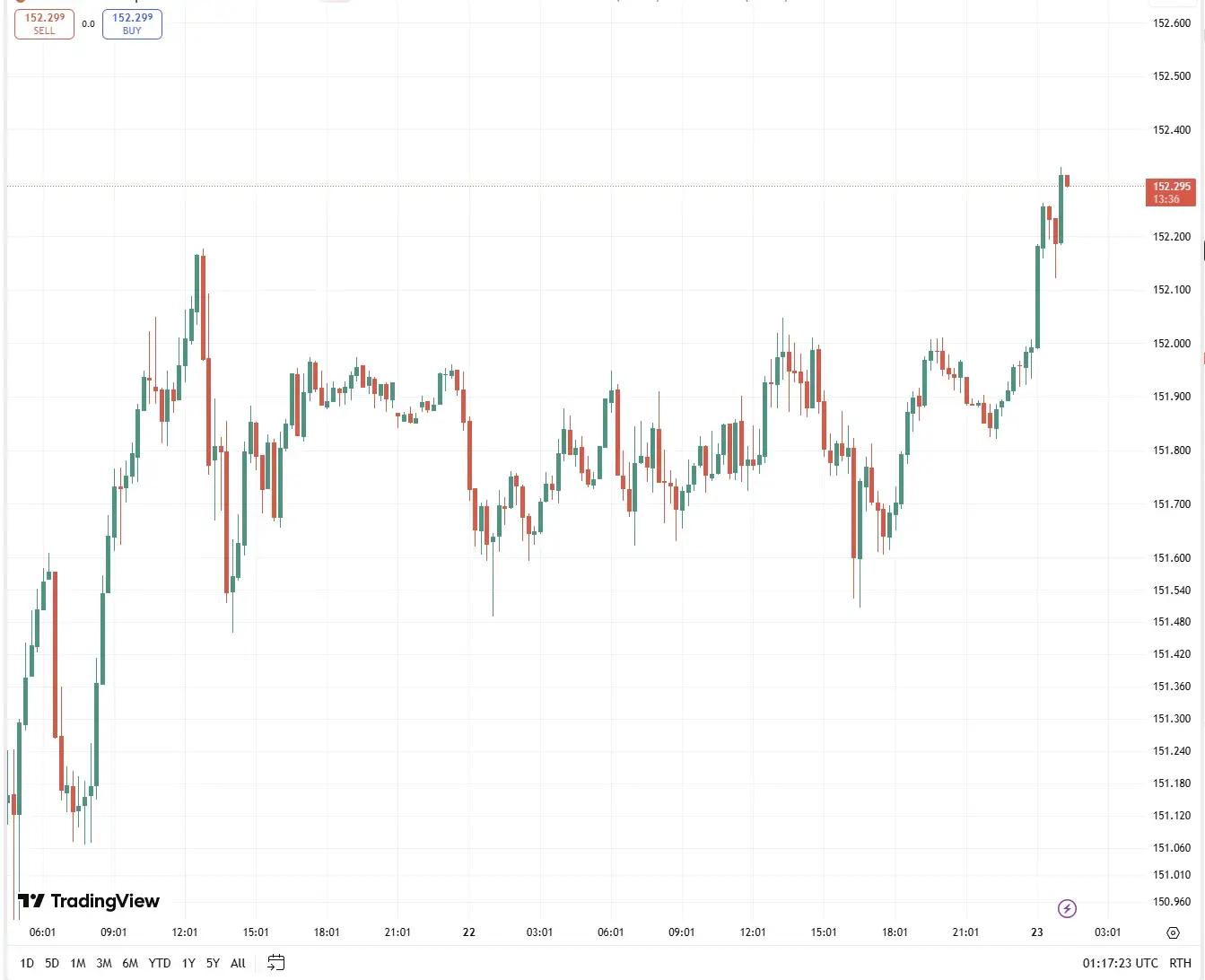
TradingView (recommended)
- Load your pair and timeframe (e.g. EUR/USD, H4).
- Hide anything you don't want ChatGPT to comment on — extra indicators, custom drawings, other traders' ideas.
- Make sure the price axis on the right is clearly visible with numbers.
- Use Ctrl+Alt+S (or the camera icon) to export a PNG. Avoid screen-snip tools that crop the axis.
MT4 / MT5
- Open the chart, right-click → Save As Picture….
- Choose Active Chart (not Active workspace) so the image is clean.
- Save as PNG — JPG artifacts can confuse the vision model on candle wicks.
Common mistake: uploading a mobile screenshot with the broker's UI chrome, the tab bar, the Discord overlay, and half the chart cut off. ChatGPT will either refuse to read it or guess. Always screenshot the chart alone, on a desktop, in landscape orientation.
Step 2: Upload the Screenshot to ChatGPT
Open a new conversation in ChatGPT (don't reuse an old one — old context leaks into the analysis). Click the paperclip/attachment icon in the chat composer and select your chart PNG. Wait for the image preview to appear before you type anything — this confirms the upload finished.
Then — and this is the part most Reddit threads skip — do not just type “what do you think?” and hit send. That produces generic ChatGPT filler (“I see bullish momentum, consider your risk management”). The quality of the output is entirely determined by the quality of the prompt. Move to Step 3.
Step 3: Use the Right Prompt (5 Copy-Paste Templates)
These are five prompt templates we've stress-tested against hundreds of forex screenshots. Replace the bracketed fields [LIKE_THIS] with your own context. The more specific you are, the less ChatGPT will hallucinate.
Prompt A — Basic Structure Identification
Start here. This prompt just asks ChatGPT to describe what's visible. It's the lowest-risk way to validate whether the model is actually reading your chart correctly.
You are an experienced forex technical analyst. I've attached a chart of
[PAIR, e.g. EUR/USD] on the [TIMEFRAME, e.g. H4] timeframe.

Describe ONLY what is visible in the chart image:
1. Current trend direction (uptrend / downtrend / ranging)
2. Last 3 significant swing highs and swing lows (approximate prices)
3. Any obvious candlestick patterns at the most recent candle
4. The approximate current price based on where the last candle closes

Do NOT make up levels that aren't in the image. If you cannot read
the price axis clearly, say so.
Prompt B — Support and Resistance Levels
Once basic structure is confirmed, ask for S/R. Force ChatGPT to justify every level with a visual anchor so it can't invent round numbers.
For this [PAIR] [TIMEFRAME] chart, identify the 3 strongest support
and 3 strongest resistance levels visible on screen.

For each level, return:
- Approximate price
- The REASON it's a level (e.g. "previous swing high", "triple-tested
  support", "round number confluence", "order block")
- How many times price has reacted at that level in the visible window

Rule: do not list any level you cannot point to visually on the chart.
If you're unsure about exact price, give a tight range instead.
Prompt C — Pattern Recognition
This is where ChatGPT is strongest. Vision models are trained on massive amounts of chart imagery and they're genuinely good at naming shapes — as long as you force them to specify where the pattern is.
Analyze this [PAIR] [TIMEFRAME] chart for chart patterns and
candlestick patterns.

For CHART PATTERNS, look for: bull/bear flag, pennant, ascending/
descending triangle, rising/falling wedge, head and shoulders,
inverse H&S, double top, double bottom, cup and handle.

For CANDLESTICK PATTERNS, look only at the last 5 candles: bullish/
bearish engulfing, pin bar, doji, hammer, shooting star, inside bar,
morning/evening star.

For each pattern you identify:
- Name it
- Describe WHERE on the chart it sits (left/middle/right, at what level)
- State if it's completed or still forming
- Give the textbook directional bias

If no valid pattern exists, say so. Do not force a pattern.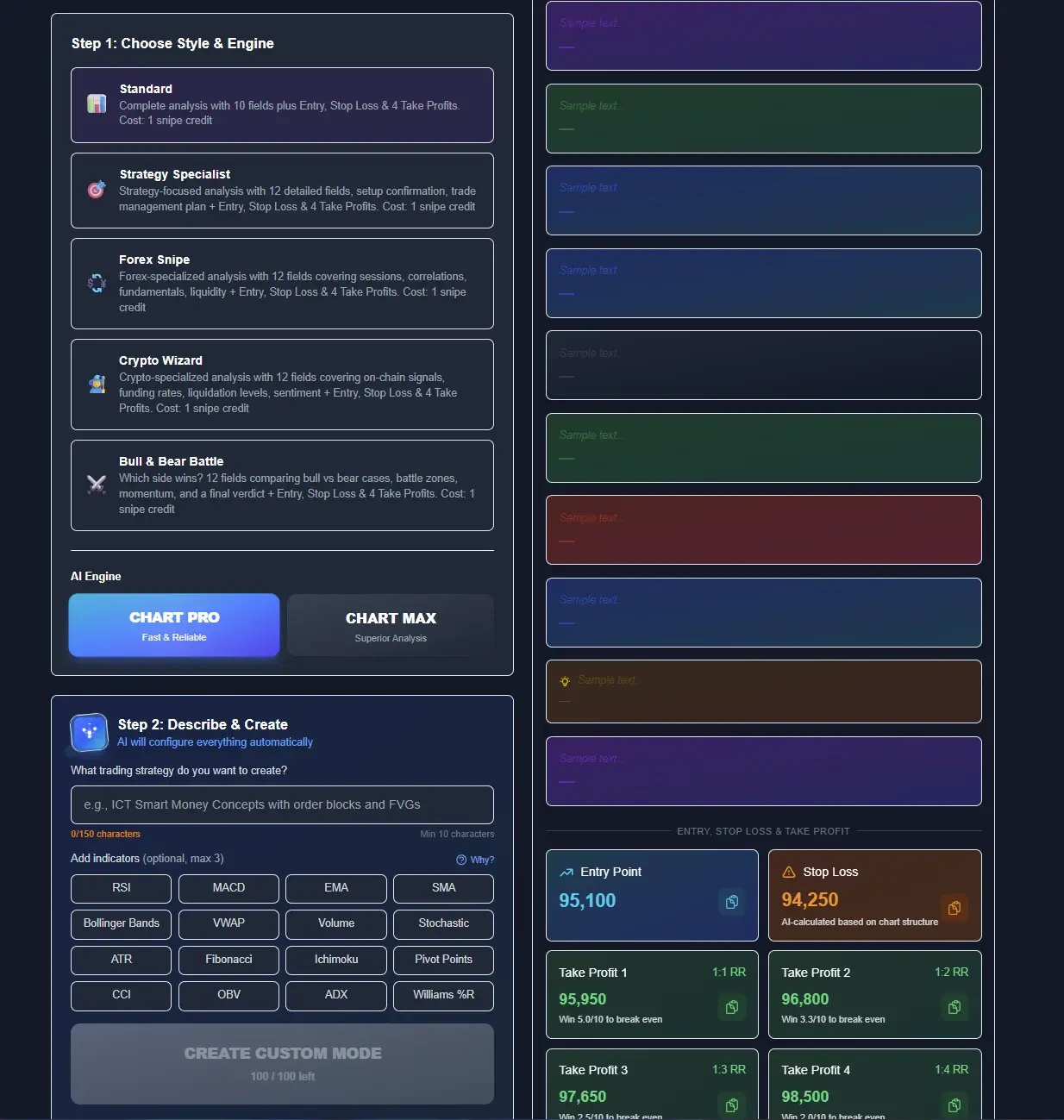
The depth of this setup screen is the part you cannot easily replicate in ChatGPT. In a raw chat you either pick one indicator at a time or you jam 16 of them into a 400-word prompt and hope the model keeps them straight across the reply. Here the 16 toggles are structural — they change what the AI is actually allowed to reference in its output. The five engines are different system prompts stacked on top of the same vision model, tuned for scalpers, swing structure traders, forex, crypto, and bull-vs-bear debate. The same chart fed to Forex Snipe and Crypto Wizard produces two different reads, both internally consistent, neither one requiring you to type a prompt.
The panel on the right of that screen is the piece most traders are trying to copy-paste out of ChatGPT's replies — a concrete entry, a concrete stop loss, and four take profits each labelled with their risk-to-reward ratio. In the screenshot above, the setup reads Entry 95100, SL 94250, TP1 95950 at 1.1R, TP2 96800 at 1.2R, TP3 97650 at 1.3R, TP4 98500 at 1.4R. That structured output is what Prompt D tries to coax out of ChatGPT — and what ChartSnipe just returns by default.
Prompt D — Full Trade Setup (Entry, Stop, Target)
This is the prompt most traders actually want. Note how specific the output format is — this is what prevents ChatGPT from giving you a four-paragraph essay that ends in “always manage your risk.”
Based on the attached [PAIR] [TIMEFRAME] chart, and given the following
context I already know:
- Current session: [LONDON / NEW YORK / ASIA]
- Recent news: [e.g. "NFP beat expectations earlier today, DXY rallied"]
- My trading style: [SCALP / INTRADAY / SWING]
- My account risk per trade: [e.g. 1%]

Give me one single trade setup in this exact format:

DIRECTION: [BUY / SELL / NO TRADE]
ENTRY ZONE: [price or tight range]
STOP LOSS: [price] — [reason, e.g. "below swing low at 1.0820"]
TAKE PROFIT 1: [price] — [reason]
TAKE PROFIT 2: [price] — [reason]
RISK:REWARD: [ratio to TP1]
INVALIDATION: [what price action would kill this setup]
CONFIDENCE: [LOW / MEDIUM / HIGH] — [one sentence why]

If the chart doesn't show a clean setup, answer NO TRADE and explain
in one sentence. Do not force a trade.
Why this works: the “do not force a trade” line is critical. Without it, ChatGPT's helpfulness bias will give you a setup even on nonsense charts. With it, you get honest NO TRADE verdicts on low-quality setups.
Prompt E — Multi-Timeframe Bias
Upload two or three charts of the same pair (e.g. Daily, H4, M15) in the same message, then use this prompt. ChatGPT handles multi-image context reasonably well since GPT-4o.
I've attached 3 charts of [PAIR]:
Image 1: Daily
Image 2: H4
Image 3: M15

Give me a top-down multi-timeframe analysis:

1. DAILY bias: trend direction + key structural level
2. H4 bias: is it aligned with the daily, or in a pullback?
3. M15 entry trigger: what specific price action would you wait for
   to enter a trade that is aligned with the daily bias?

End with a single sentence: "Aligned trade setup" OR
"Conflicting timeframes — stand aside".
Save these five prompts in a note file. You'll reuse them constantly. For a broader look at whether ChatGPT is the right tool at all, read our sibling post Does ChatGPT Work for Trading Charts?
Step 4: Verify ChatGPT's Output
Never take ChatGPT's analysis at face value. Every time — every single time — run its output back through this 60-second sanity check before placing a trade based on it.
Not the screenshot. The live chart. Place the exact levels ChatGPT gave you as horizontal lines. Do they actually touch anything?
ChatGPT has no live feed. Its estimate of “current price” is from wherever the last candle was when you took the screenshot. If you're trading live, re-check.
If ChatGPT called it a bull flag, does it actually have the required structure — strong impulse leg, tight pullback channel, volume contraction? Or is it just a random pullback?
ChatGPT has no idea about today's economic calendar. If NFP is in 20 minutes, its setup is irrelevant. Cross-check with an AI economic calendar.
Reply “argue the opposite case — why might this trade fail?” ChatGPT will flip and give you the bear case. This exposes weak setups fast.
The Limits: 5 Things ChatGPT Will Get Wrong on Your Forex Chart
This is the part Reddit threads usually skip. ChatGPT looks confident, so people assume it's right. It isn't — especially on these five specific failure modes.
1. No live prices
ChatGPT has zero knowledge of where EUR/USD or gold is trading right now. Its “current price” is read from the last candle pixel in your screenshot. Place a trade based on that 10 minutes later and you're already stale. This is the single biggest reason people lose money following ChatGPT-only setups.
2. Invented support and resistance levels
Ask for S/R and ChatGPT sometimes confidently returns round numbers that aren't actually reacting points on your chart. It defaults to psychology (“1.1000 is a round number”) even when price ignored that level. You'll only catch this if you pull the level back onto the real chart in Step 4.
3. Zero news context
ChatGPT doesn't know FOMC is at 2pm today. It doesn't know the ECB cut rates 30 minutes ago. It doesn't know your pair is about to get hit by a CPI release. Every trade idea it gives you is news-blind. Our NewsImpact AI layer fixes this by ranking all 32 instruments by today's real-world catalysts.
4. No DXY or correlation awareness
A EUR/USD long is a USD short. If DXY is breaking out to the upside, your EUR/USD setup is dead regardless of how pretty the pattern looks. ChatGPT has no cross-instrument context unless you manually feed it DXY, gold, bonds, and correlated pairs — which defeats the purpose.
5. Confidently wrong pattern names
Vision models are trained to please. If your chart even vaguely resembles a head and shoulders, ChatGPT will call it one — even if the shoulders are at different heights, the neckline is sloping wrong, and volume profile doesn't confirm. Always verify with the textbook definition.
The Shortcut: ChartSnipe Does This in 3 Seconds
Here's the honest pitch. If you followed everything above, you now know how to coax decent forex analysis out of ChatGPT. You also know it takes five prompts, constant verification, manual news lookup, and a healthy skepticism of every level. That's fine if you're learning. It's miserable if you're trying to trade.
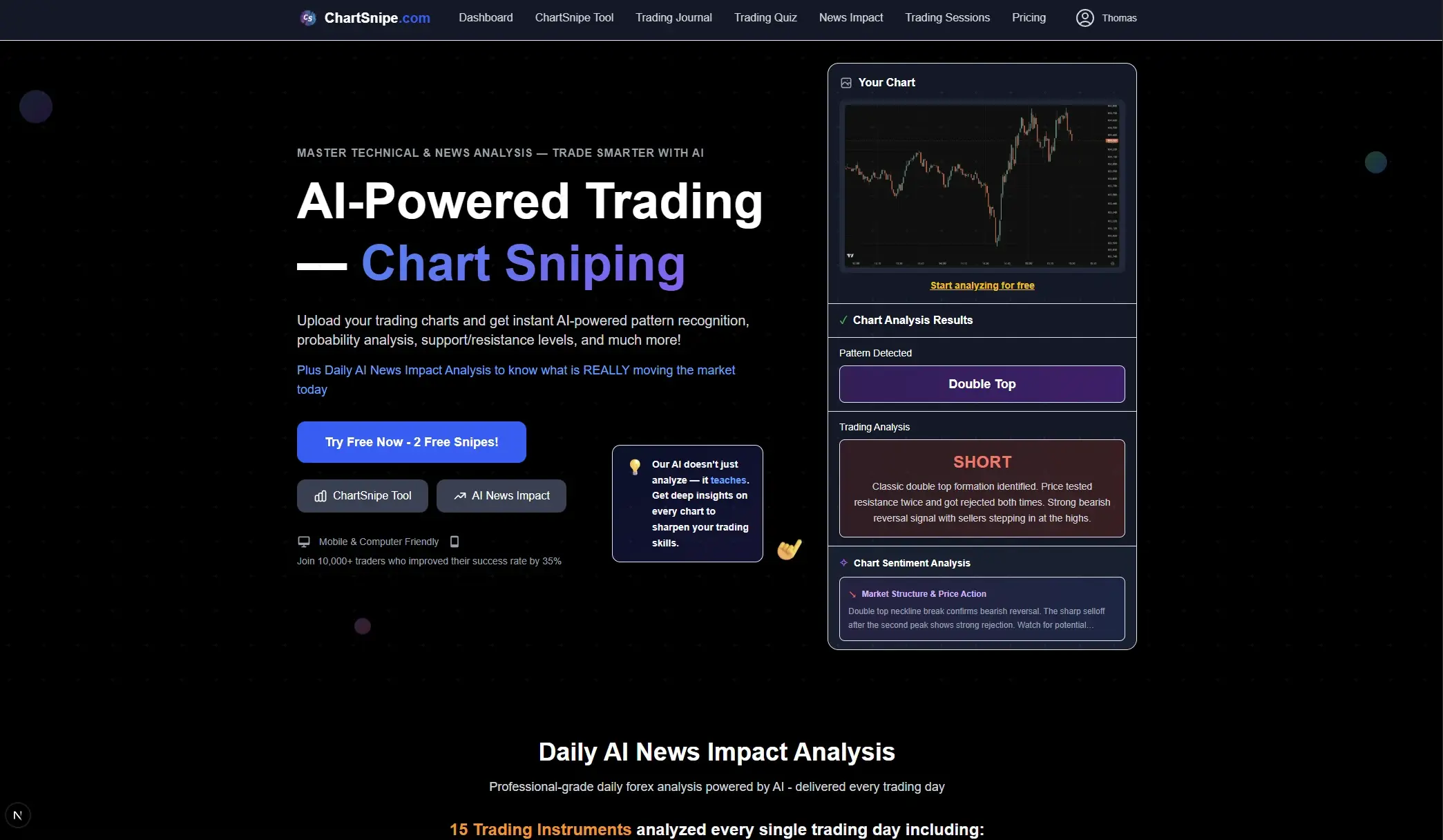
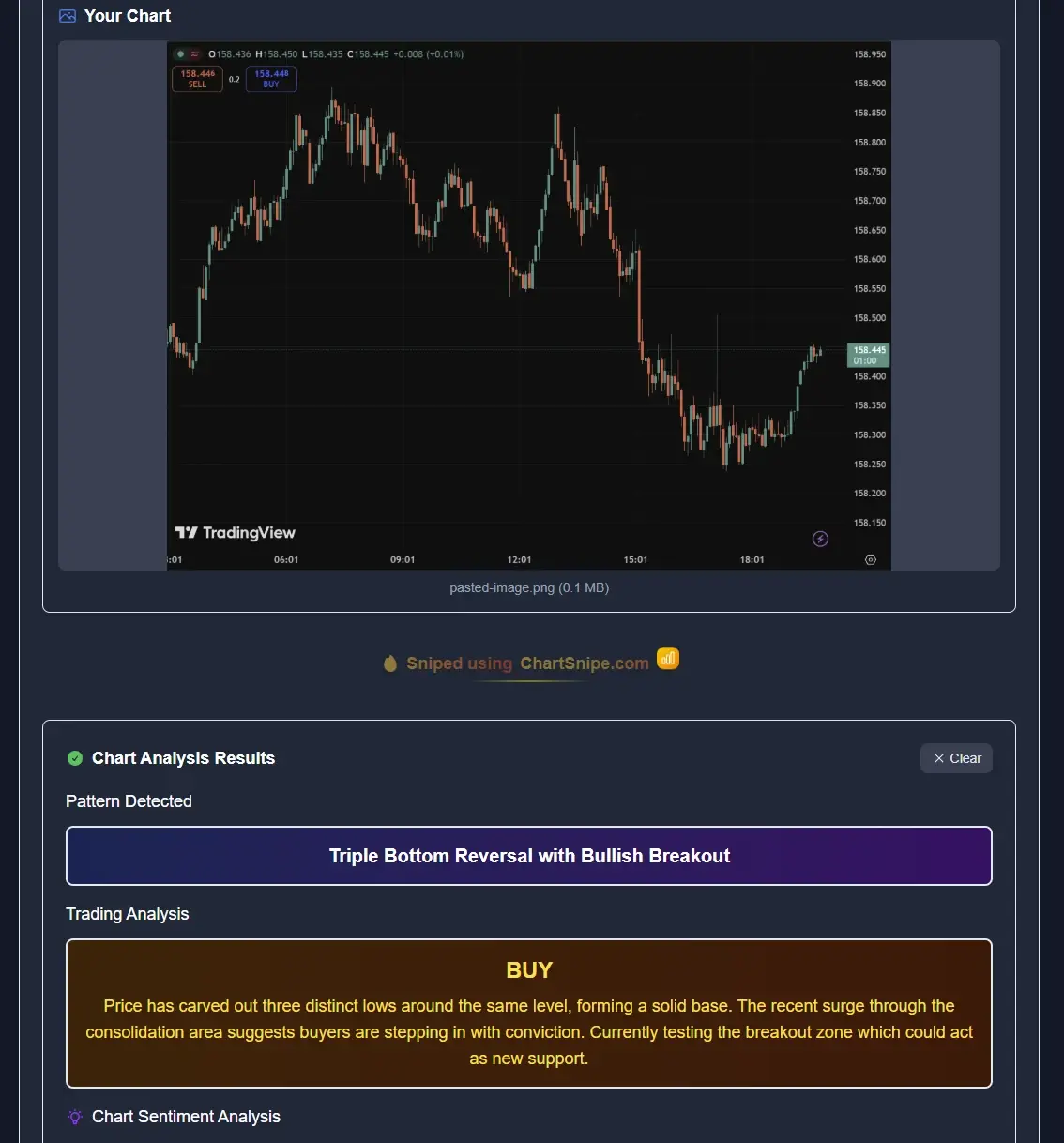
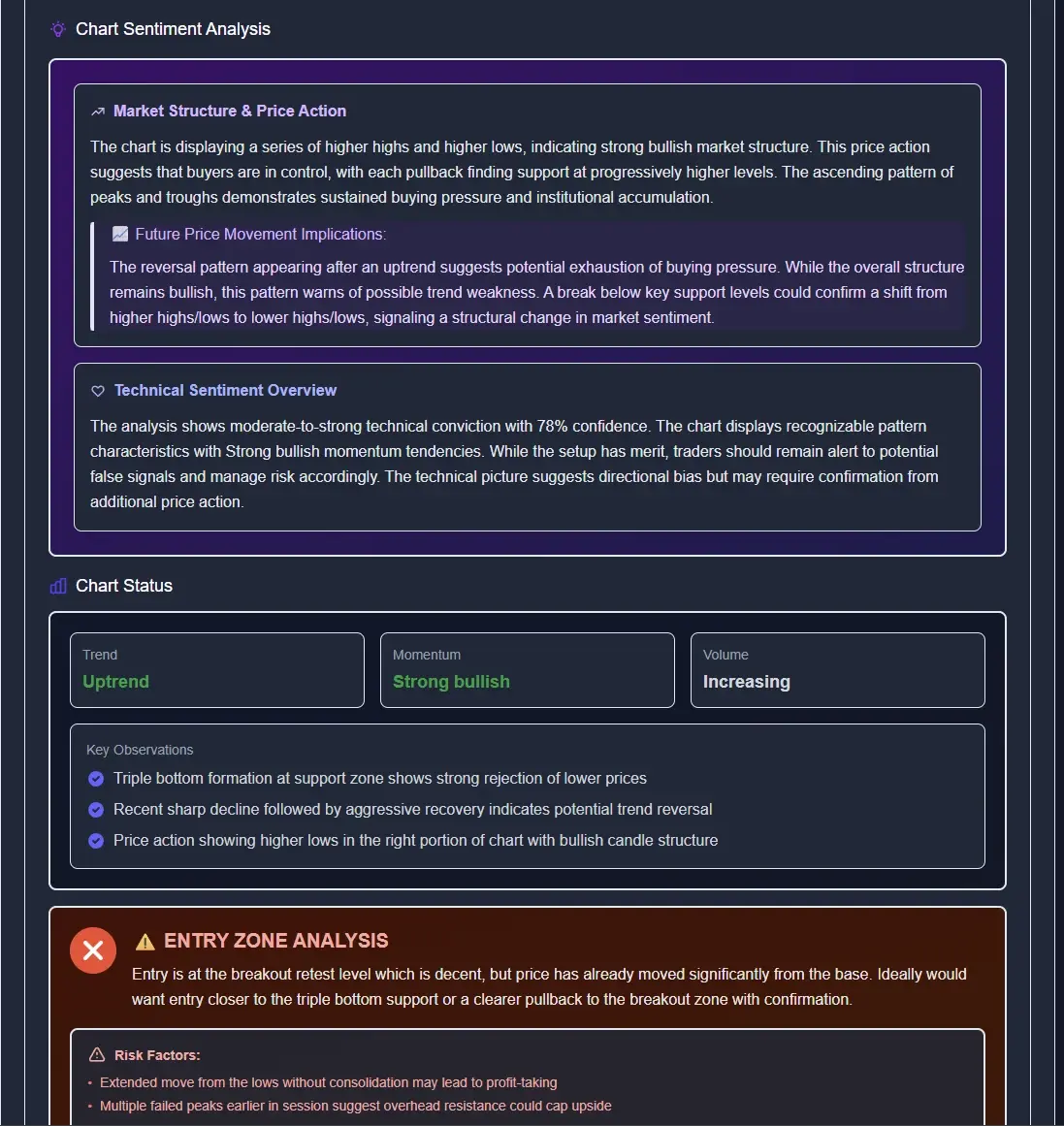
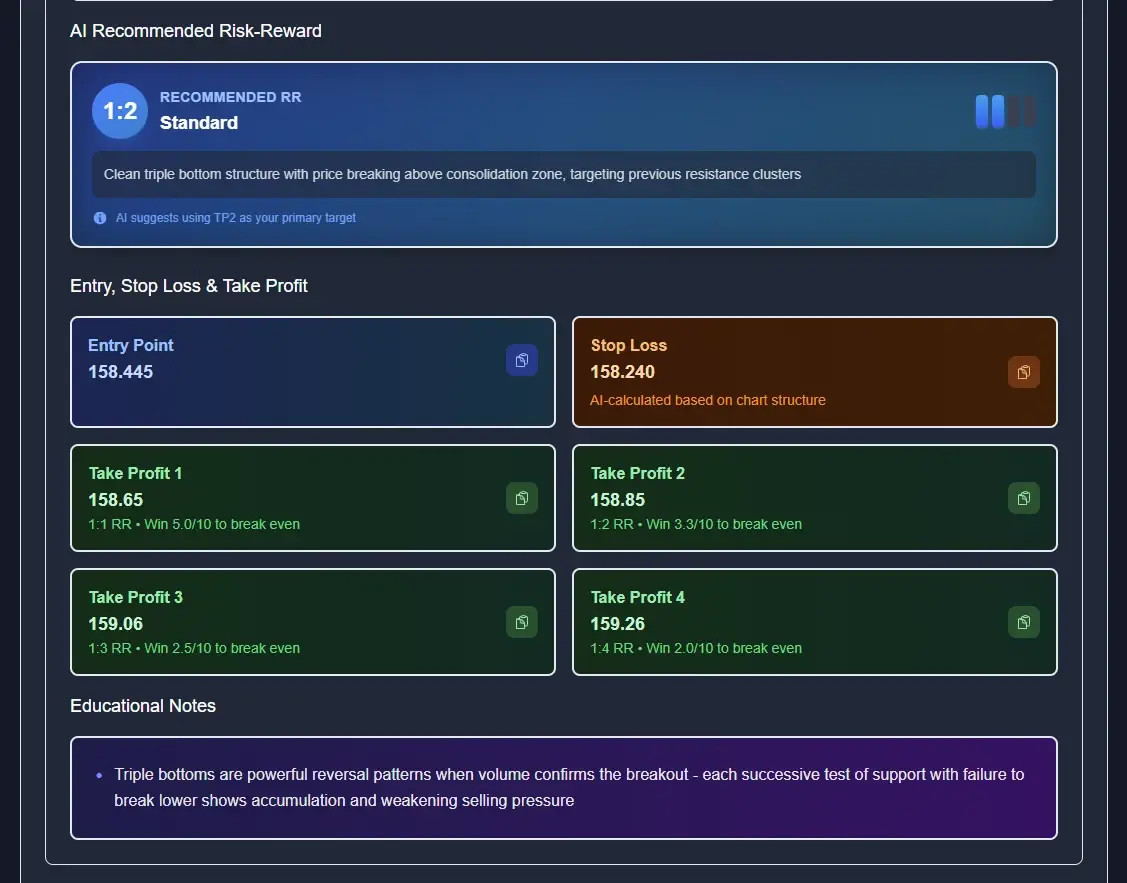
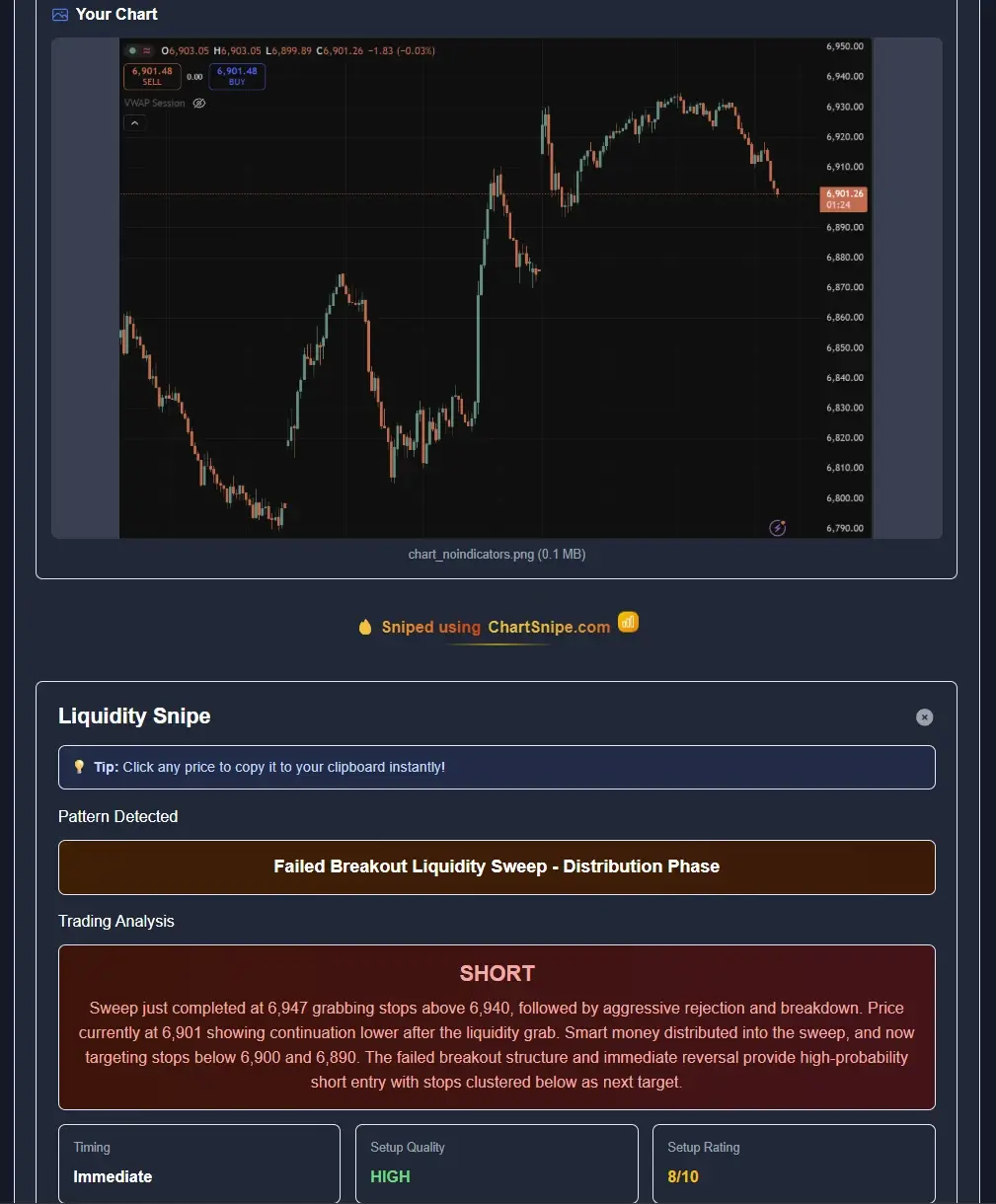
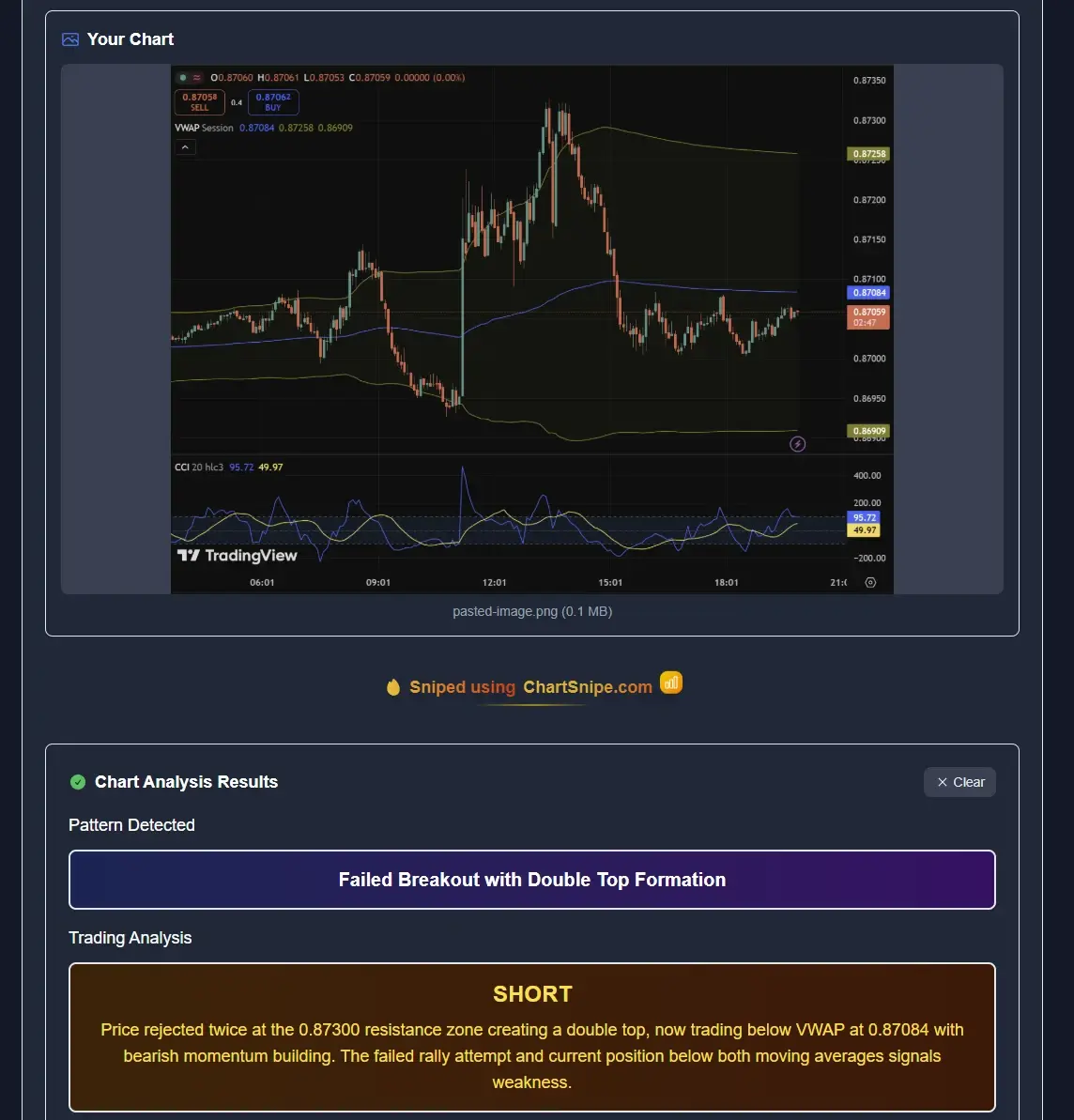
ChartSnipe is a purpose-built tool that collapses this entire workflow into a single action: drop a chart screenshot, get a structured trade plan in about 3 seconds. No prompts to write, no levels to verify, no news gaps to fill in.
No prompt engineering
Six specialised analysis modes replace five separate ChatGPT prompts. Pick Quick Snipe, Full Snipe, S&R Levels, Liquidity Snipe, Beat Another, or a custom mode.
Live forex prices baked in
Live prices for 28 FX pairs plus DXY, gold, S&P 500 and US Tech 100 update every few minutes. Your trade plan uses the real current price, not a stale screenshot.
Integrated news impact
NewsImpact ranks every major instrument by today's real news catalysts so your setup isn't news-blind.
Zero hallucinated levels
Every level is anchored to visible structure. No invented round numbers. No “confident but wrong” pattern labels. Visit the Chart Snipe tool.
What this actually looks like over dozens of real charts
The single-screenshot demos above are easy to stage — any tool can make one good-looking trade idea. The honest test is what a tool does across dozens of analyses on real pairs, day after day. Below is the Analysis History page from an actual ChartSnipe account, with the last set of analyses on USDJPY, BTC/USD, XAUUSD and CHINAH — each one tagged with its verdict and the exact pattern the AI called on the chart.
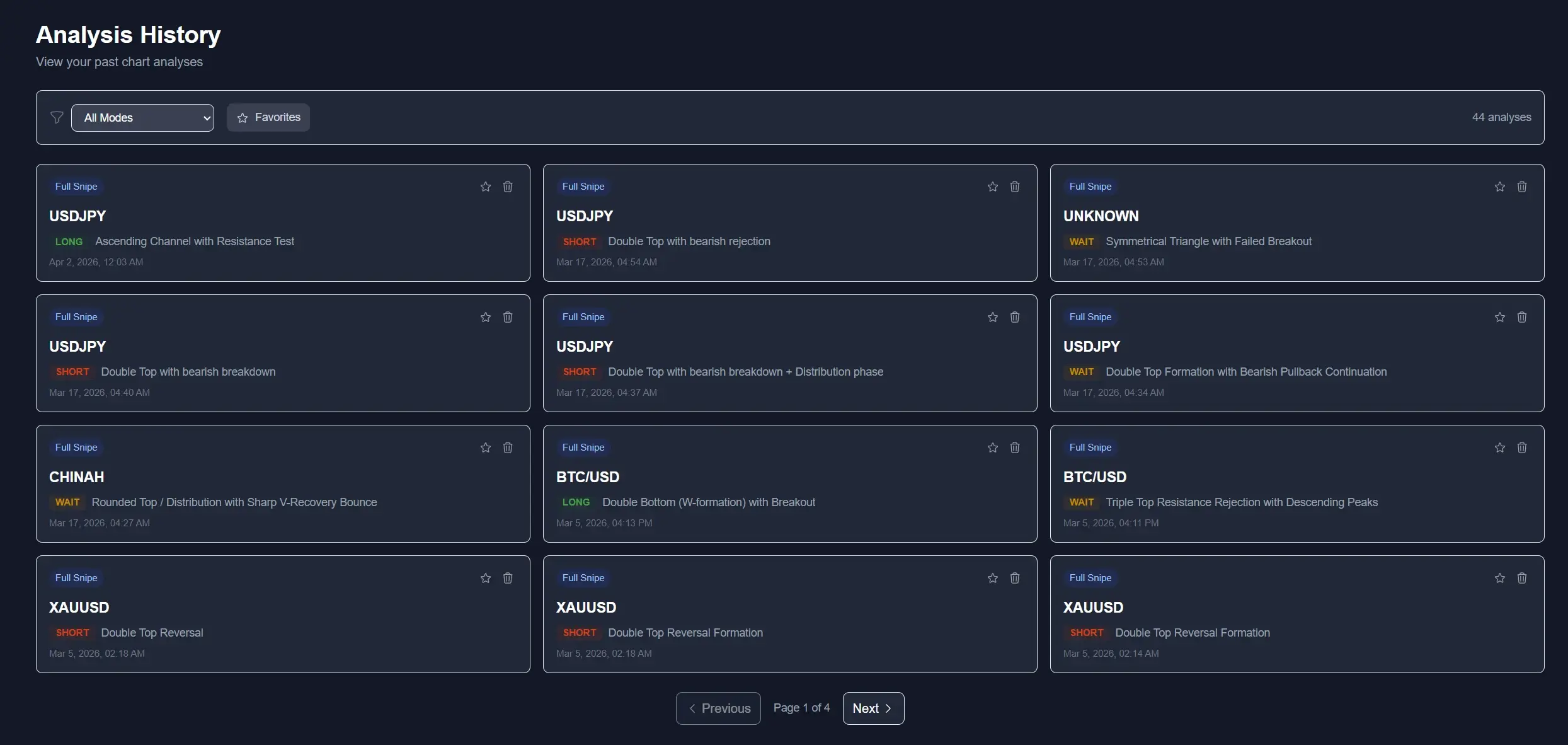
Three things worth noticing in that history. First, the pattern labels are specific — not “bullish structure” but “Ascending Channel with Resistance Test” and “Triple Top Resistance Rejection”. Second, the verdicts include WAIT calls, not just LONG and SHORT — which is the behaviour Prompt D in the ChatGPT workflow above has to explicitly bolt on with the “do not force a trade” guardrail. Third, the same pair (USDJPY) shows up multiple times with different verdicts across different sessions, because the tool re-reads structure as price evolves rather than locking in one directional narrative.
None of this is impossible to do with ChatGPT. It just takes you writing Prompt A through Prompt E every single time, copy-pasting the output into a notes app, manually tagging verdicts, and hoping the model doesn't hallucinate the pattern name halfway through. That is the gap a purpose-built tool closes.
Side-by-Side: Manual ChatGPT Workflow vs ChartSnipe
| Step | ChatGPT (Manual) | ChartSnipe |
|---|---|---|
| Screenshot chart | Yes | Yes |
| Write prompt | Required (5 templates) | None — just pick a mode |
| Live prices | No | Yes — 28 FX + DXY + gold + indices |
| News context | You feed it manually | Integrated NewsImpact layer |
| Risk of invented levels | High | Low — anchored to visible structure |
| Verification needed | Always (5-point checklist) | Minimal |
| Time to output | 3–10 minutes | ~3 seconds |
| Cost | $20/mo ChatGPT Plus | Free tier available, paid from $20/mo |
For a wider comparison of AI chart tools, see Best AI Trading Chart Analysis Software in 2026 and our breakdown of the best AI chart screenshot analysis tools. If you want the full ChartSnipe plan comparison, head to pricing.
Skip the prompt engineering.
Drop a forex chart into ChartSnipe and get a complete trade plan in 3 seconds.
Try ChartSnipe FreeFAQ
Can ChatGPT actually analyze a forex chart?
Yes, ChatGPT Plus with GPT-4o vision can look at a forex chart screenshot and describe trend, structure, patterns and rough S/R zones. It cannot pull live prices, and it will occasionally invent levels, so you must always verify its output before trading.
Do I need ChatGPT Plus to analyze charts?
Yes. The free tier does not reliably support image uploads for technical analysis. You need Plus (currently $20/month) for GPT-4o vision.
What is the best prompt for ChatGPT forex analysis?
Structured prompts that specify the pair, timeframe, trading style, and exact output format (see Prompt D above). Generic “analyze this chart” prompts produce generic output.
Why does ChatGPT get prices wrong on my forex chart?
It reads price as pixels, not as data. Small axis mis-reads, cropped charts, or low-resolution screenshots cause it to estimate wrong levels. It also has no live price feed.
Is ChatGPT better than a purpose-built tool like ChartSnipe?
ChatGPT is more flexible for general questions. For forex chart analysis specifically, ChartSnipe is faster and more reliable — no prompts, live prices, integrated news, structured output in about 3 seconds.
What do people on Reddit say about using ChatGPT for forex?
Consensus across r/Forex, r/algotrading and r/ChatGPT is that ChatGPT is a useful brainstorming partner and a decent second opinion, but not a standalone trading signal. Most experienced traders recommend verifying every level before acting on it.
Sources & Further Reading
- • OpenAI — GPT-4o Announcement — official documentation of the vision model used in ChatGPT Plus for image analysis.
- • BabyPips School of Pipsology — foundational forex technical analysis concepts every AI prompt should reference.
- • Investopedia — Technical Analysis — canonical definitions of support, resistance, trend and pattern vocabulary used in prompts.
- • TradingView Ideas — the chart platform most traders use to export clean PNG screenshots for ChatGPT.
- • Forex Factory — long-running community discussion threads on using AI tools for forex chart analysis.
Related Articles
Does ChatGPT Actually Work for Trading Charts?
Honest breakdown of where ChatGPT vision actually helps traders, and where it silently fails on chart screenshots.
Claude vs ChatGPT vs ChartSnipe
Same chart screenshot, three AIs — see which model produces the most useful forex analysis in a head-to-head.
Best AI Chart Screenshot Analysis Tools Tested in 2026
The purpose-built alternatives to ChatGPT, ranked by speed, accuracy, and forex-specific features.

Written by the ChartSnipe Team
ChartSnipe is an AI-powered chart screenshot analysis tool and daily AI news impact analysis platform for forex, gold, Bitcoin, S&P 500, and Nasdaq traders. Our team combines deep experience in technical analysis, AI vision models, and live market data across 32+ instruments to deliver actionable trading insights.
Stop prompt-engineering your trades.
ChartSnipe gives you the output of all five ChatGPT prompts above — in one click, with live forex prices and integrated news context. Built for forex traders, not general chat.