
Stop Order vs Stop Limit Order
Same trigger price, one different instruction after it. That one difference decides whether you get a bad price or no fill at all, and on the wrong day it is worth a few hundred dollars per lot.
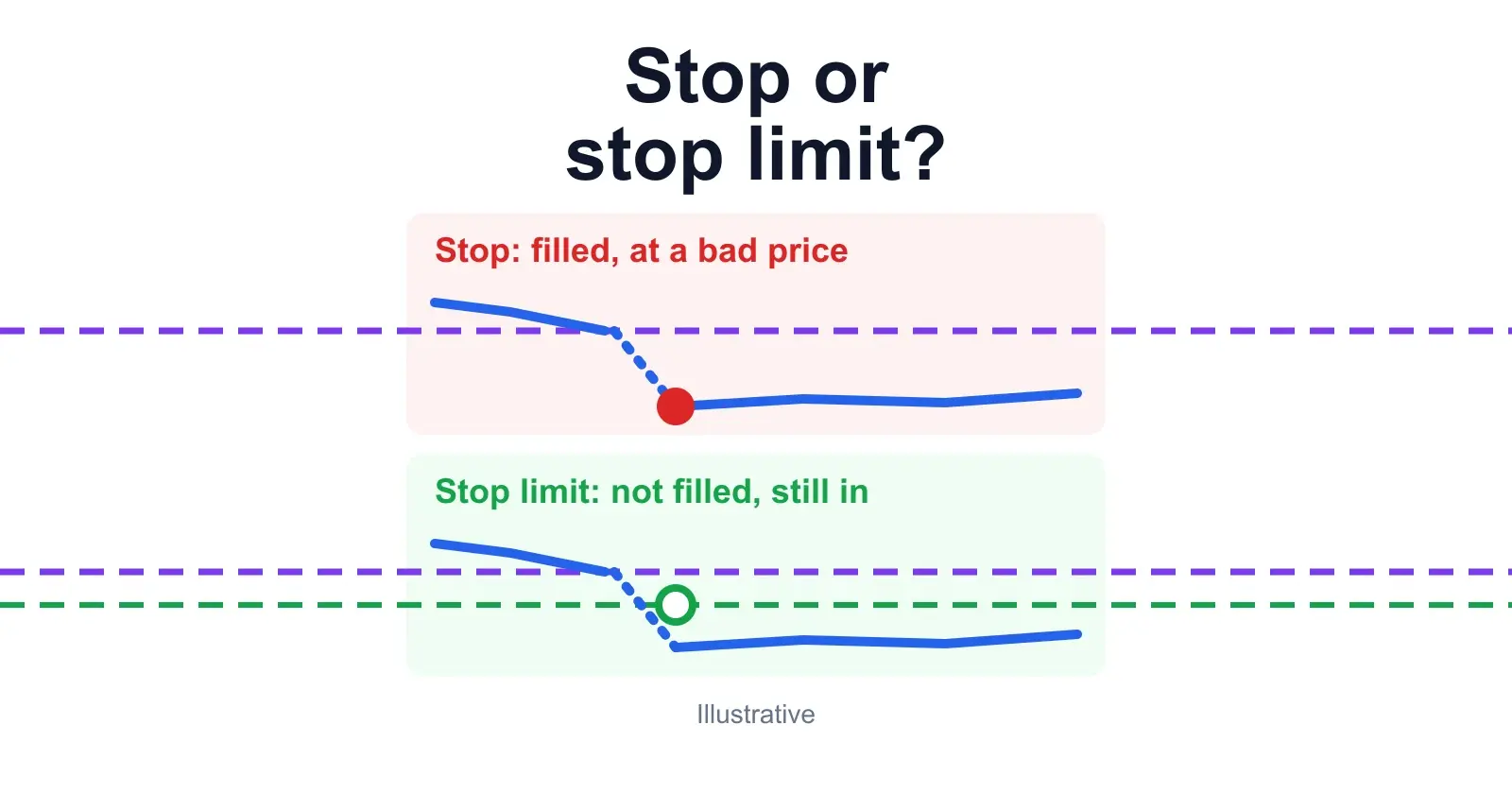
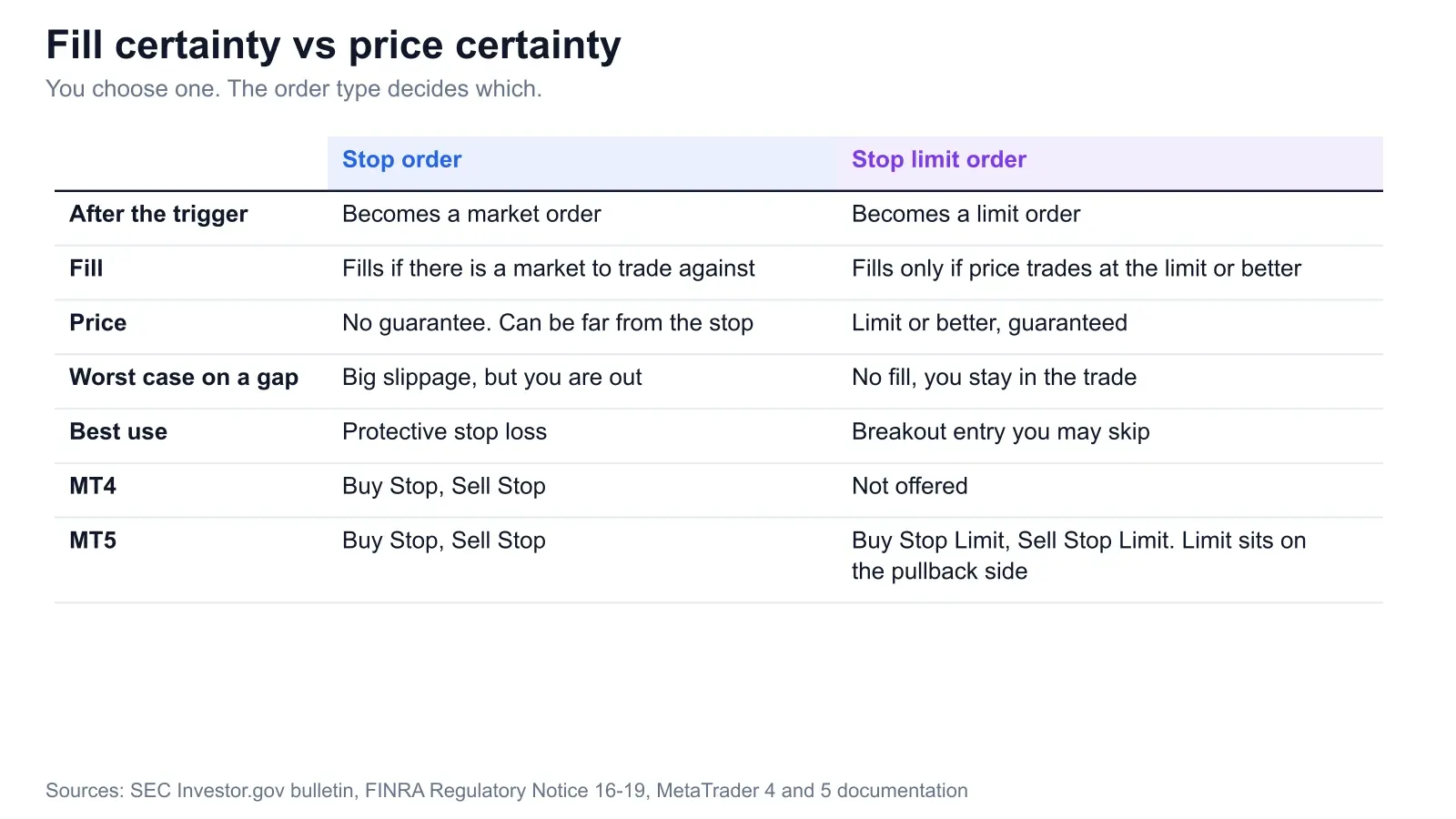
A stop order and a stop limit order both sit dormant until the market trades at your stop price. The difference is what they turn into. A stop order becomes a market order: it fills at the next available price, and that price can be well away from your stop. A stop limit order becomes a limit order: it fills only at your limit price or better, and if price blows through the limit, it does not fill at all.
So you are choosing between a fill with no price promise and a price promise with no fill. The SEC's investor bulletin says it plainly: the stop price is not the guaranteed execution price, and with a stop limit “the limit price may prevent the order from being executed.” The rest of this post puts dollars on that trade-off, then tells you which one to use where.
Key Takeaways
- →Stop order: becomes a market order, fills if there is a market to trade against, no price guarantee. Stop limit: becomes a limit order, price guaranteed, fill not.
- →On our weekend gap example, the stop lost $1,050 against a $500 plan. The stop limit never filled, and the trade was $1,500 down when price reached 1.0700.
- →Use a plain stop for protective exits. Use a stop limit for breakout entries you are happy to miss.
- →MT4 has no stop limit. MT5 has Buy Stop Limit and Sell Stop Limit, and its limit sits on the pullback side of the stop.
1. What is a stop limit order and how does it work?
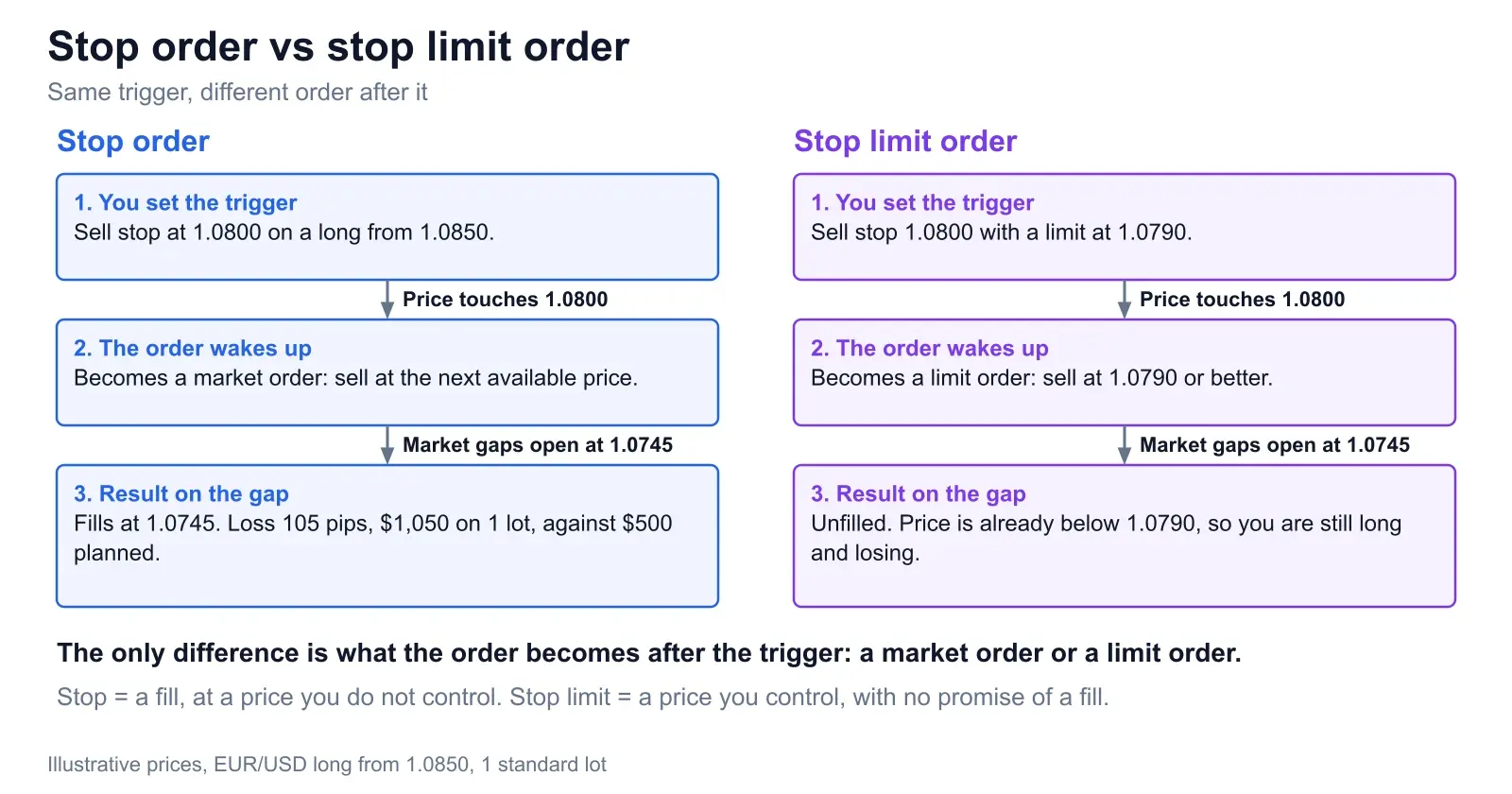
A stop limit order carries two prices. The stop price is the trigger. The limit price is the worst price you will accept once triggered. Before the trigger, nothing is in the market. After it, you have an ordinary limit order, which fills only at the limit or better. The SEC's own example is a sell stop limit with a $3.00 stop and a $2.50 limit: it becomes active if the market reaches $3.00, but can only execute at $2.50 or better.
A plain stop order has only the trigger. When it trades, you get a market order. In a calm market the two behave almost identically, which is why people use them interchangeably until the day they do not. Here is the calm case. A long from 1.0850 on EUR/USD, a sell stop at 1.0800, and for the stop limit a limit at 1.0790. Price drifts down and the trigger candle trades through 1.0800.
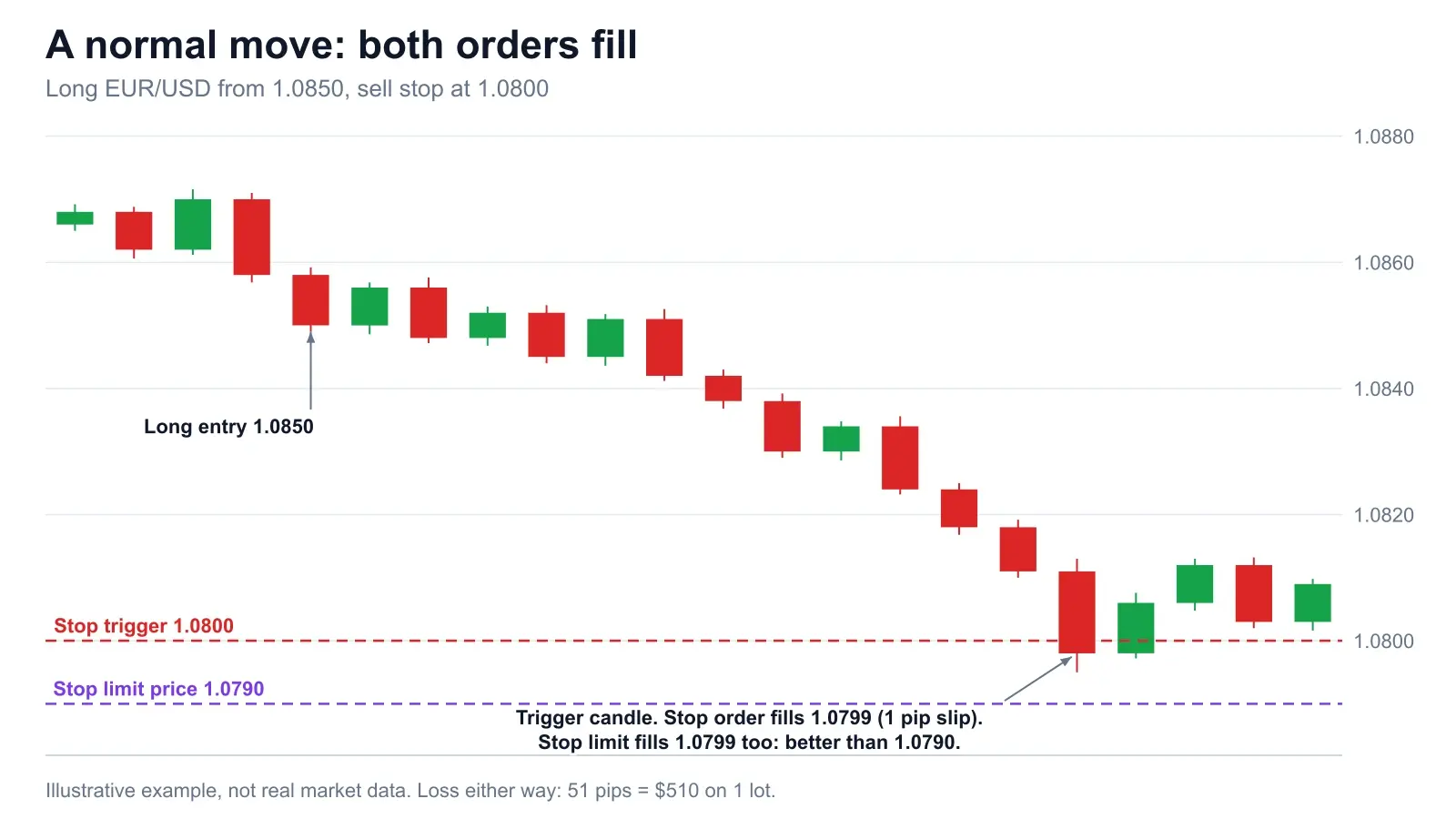
That is the whole case for stop limits, and the whole reason people trust them. Both orders did the same job. The trouble only shows up when price does not move in an orderly way.
2. Buy and sell versions of both
A sell stop sits below the market. You use it to exit a long or to enter a short on a breakdown. A buy stop sits above the market. You use it to exit a short or to enter a long on a breakout. The SEC bulletin states the same placement: a buy stop is entered above the current price, a sell stop below it.
A sell stop limit is a sell stop whose limit sits below the stop (stock-style: stop $3.00, limit $2.50). A buy stop limit is a buy stop whose limit sits above the stop, so you cap how far you will chase. That is the convention on most stock platforms. MetaTrader 5 flips it, and the platform section below explains why that matters.
One more detail the SEC flags and most traders skip: brokers differ on what counts as the stop being reached. Some use last-sale prices, others use quotes. In MetaTrader, a stop loss on a long is checked against the Bid and on a short against the Ask, so the spread decides whether you are stopped. Check what your broker uses before you trust a 1 pip margin.
3. The gap: stop fills low, stop limit does not fill
Same long from 1.0850, same stop at 1.0800, same limit at 1.0790. This time the market closes Friday at 1.0832 and opens Sunday at 1.0745, 87 pips lower, on a weekend headline. There was no price between 1.0832 and 1.0745 to trade at. Your stop order triggers on the open and becomes a market order, so it sells at 1.0745. That is 105 pips from your entry, $1,050 on one lot, against the $500 you planned to lose. The stop did its job and cost you $550 extra.
The stop limit triggers on the same open and becomes a sell limit at 1.0790. The market is at 1.0745, below the limit, so nothing fills. Your offer sits 45 pips above price. You are still long, in a market that is falling. If price continues to 1.0700, closing there costs 150 pips, $1,500. If price bounces back to 1.0790, you get out at 1.0790, 60 pips lost, $600. Which one you get is a coin flip you did not intend to make.
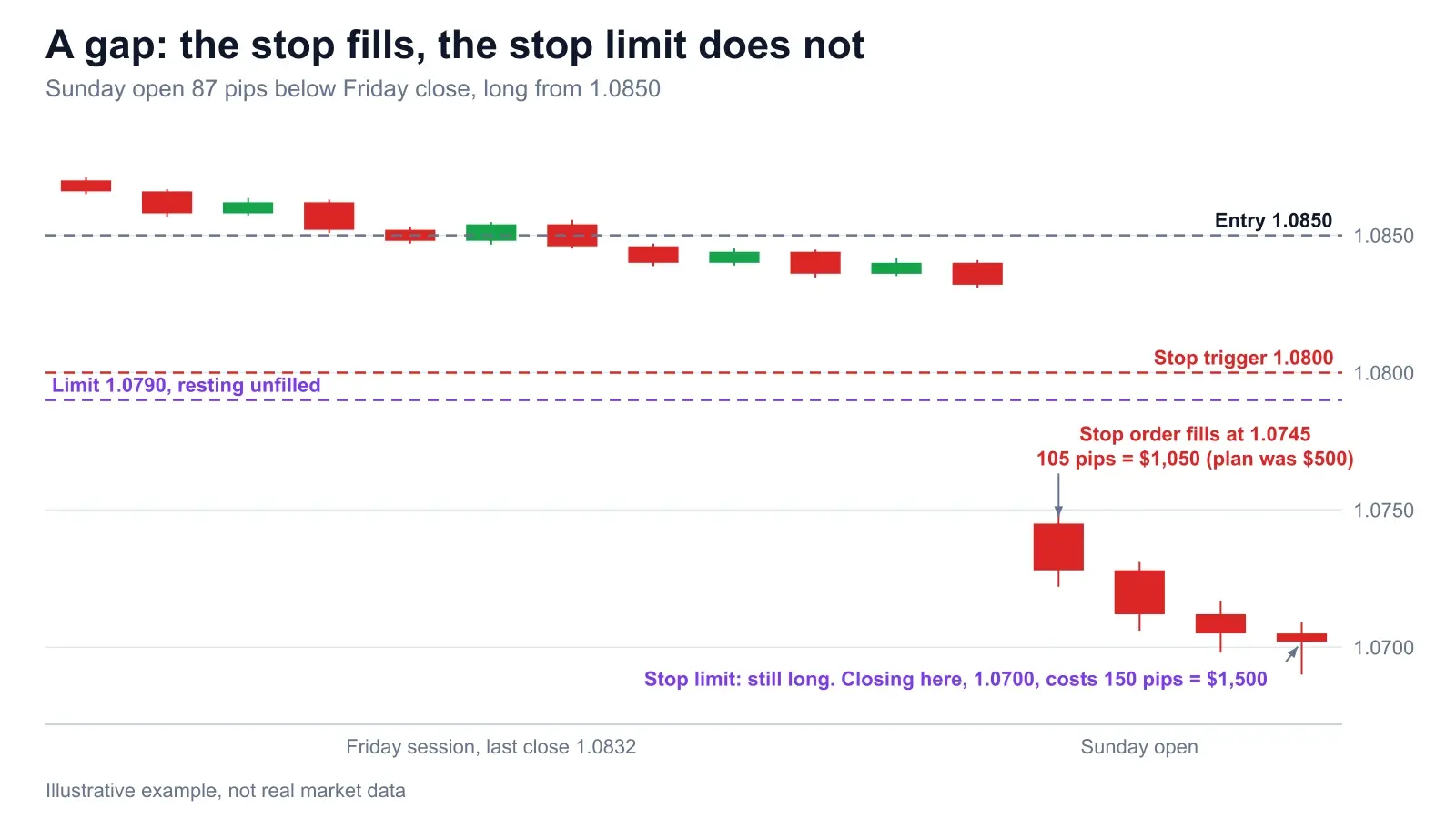
The honest framing is that neither outcome is good, but they are different kinds of bad. The stop gave you a known, finished loss. The stop limit gave you an open loss with no stop left in it. FINRA's Regulatory Notice 16-19 makes the same split: stop orders can execute far from the stop price in volatile conditions, and a stop limit order carries “the possibility that the order will not be executed at all.” Our guide to stop-loss placement methods covers where the stop itself belongs. This post is about what the stop turns into.
4. The fast news candle
You do not need a weekend for this. A one-minute data candle does it. Long EUR/USD from 1.0850 with a sell stop at 1.0820, a 30 pip stop that risks $300 on one lot. A hot print lands and the pair drops about 55 pips in a single candle. Price skips from above 1.0820 straight to 1.0804 with almost nothing trading in between. Your stop triggers at 1.0820 and fills at 1.0804. That is 16 pips of slippage, a 46 pip loss, $460 instead of $300.
A stop limit with a limit at 1.0810 triggers on the same print. Price is already at 1.0804, below the limit, so the sell limit rests unfilled. Now one of two things happens. If price keeps falling to 1.0764, you are 86 pips and $860 down and still holding. If instead the candle rebounds through 1.0810, the limit fills at 1.0810 for a 40 pip, $400 loss, which is actually better than the stop got. News candles often retrace, so the stop limit sometimes wins this one. Betting on it is not a plan.
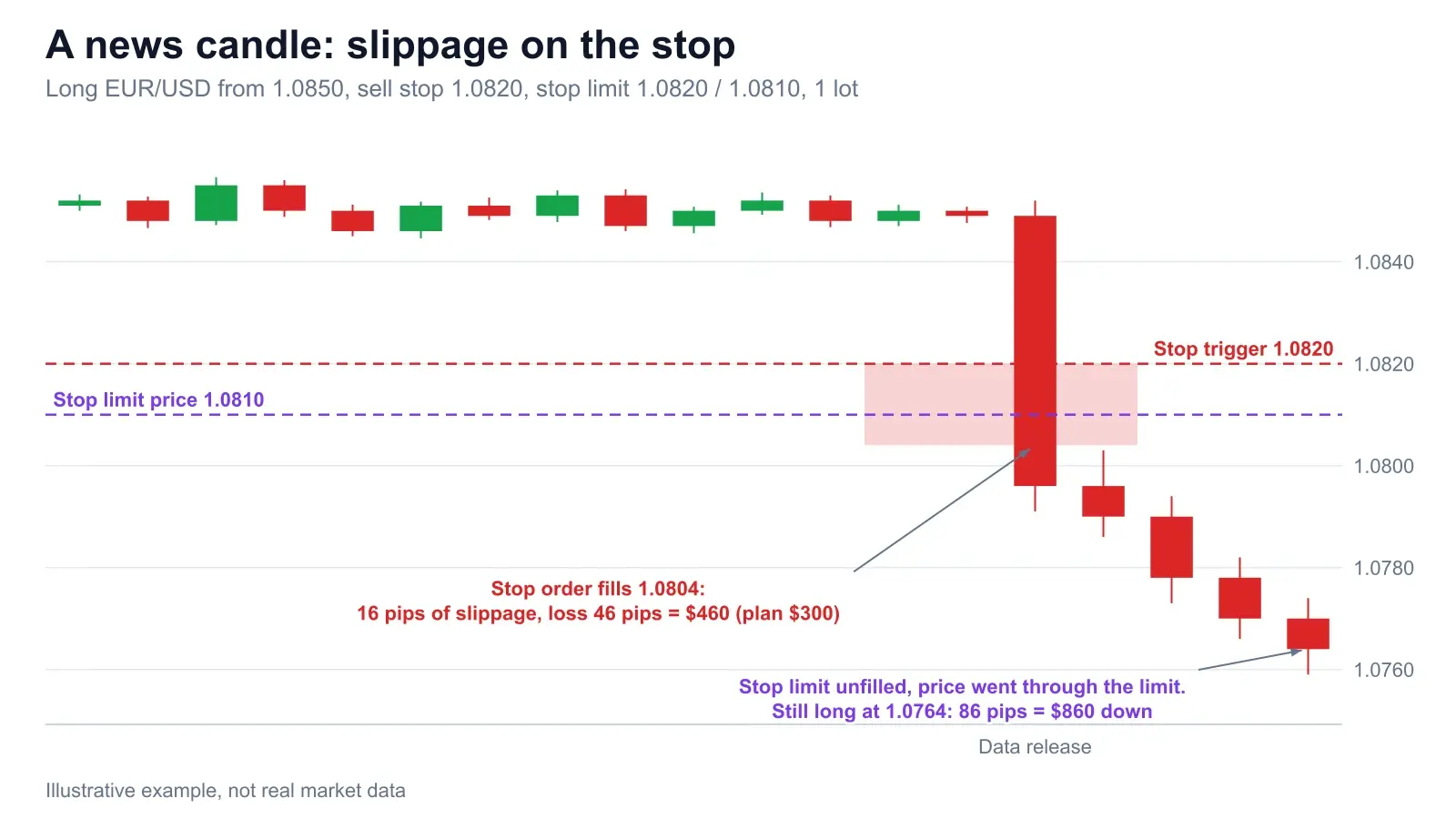
FINRA also warns that a stop can be set off by a sharp, brief move even if price later recovers, and that sell stops may “exacerbate price declines during times of extreme volatility.” That second point is about every stop in the market, not only yours. If you trade releases, how to trade NFP, CPI and FOMC walks through the spread widening and slippage that make these numbers realistic.
5. Breakout entries: buy stop vs buy stop limit
Entries flip the logic. When you are entering, missing the trade is a cost, not a disaster. Take a range with resistance at 1.0900. You place a buy stop at 1.0905 to catch the breakout. For the stop limit version, the stop is 1.0905 and the limit is 1.0910, so you refuse to pay more than 5 pips beyond the trigger.
Now a hawkish headline gaps the market open at 1.0935. The buy stop fills at 1.0935, 30 pips later than planned. The buy stop limit triggers, but a buy limit at 1.0910 is below the market and never fills. If price then runs to 1.0985, the stop buyer is 50 pips up, $500, and the stop limit trader watched it go. If the move is a fakeout and price falls back to 1.0880, the stop buyer is 55 pips down, $550, and the stop limit trader is flat. That is the real trade: paying slippage to be in the move, or paying with a missed move to stay out of the bad fills.
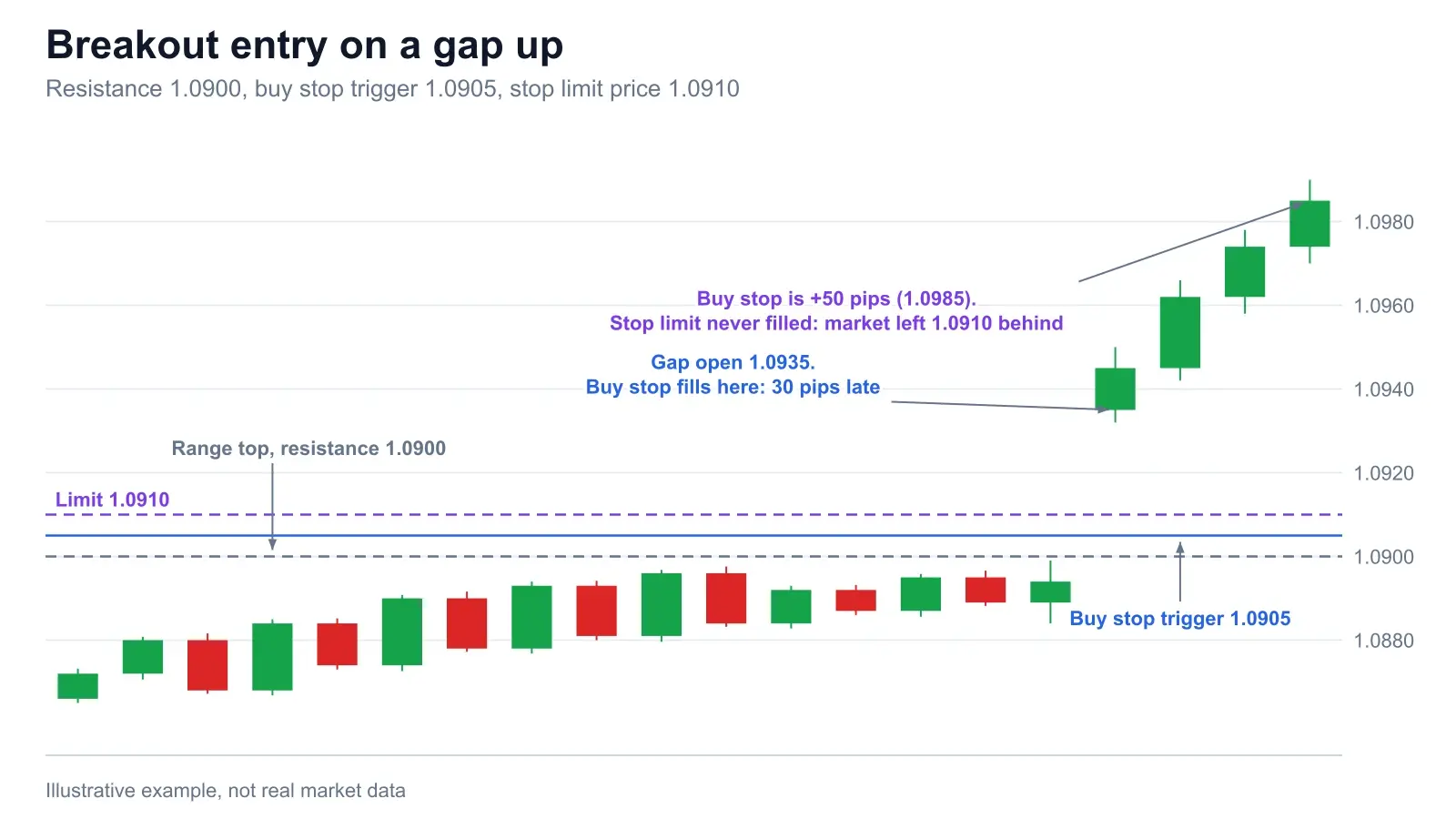
A cleaner way to size this is by risk, not by hope. If your stop sits 30 pips under the entry, filling 30 pips late means the trade starts with its stop 60 pips away, double the planned risk. Either cut the position size to match or let the stop limit skip the trade. Our guide to order types has the other options, including OCO and bracket orders.
6. Stop loss vs stop limit: which to use
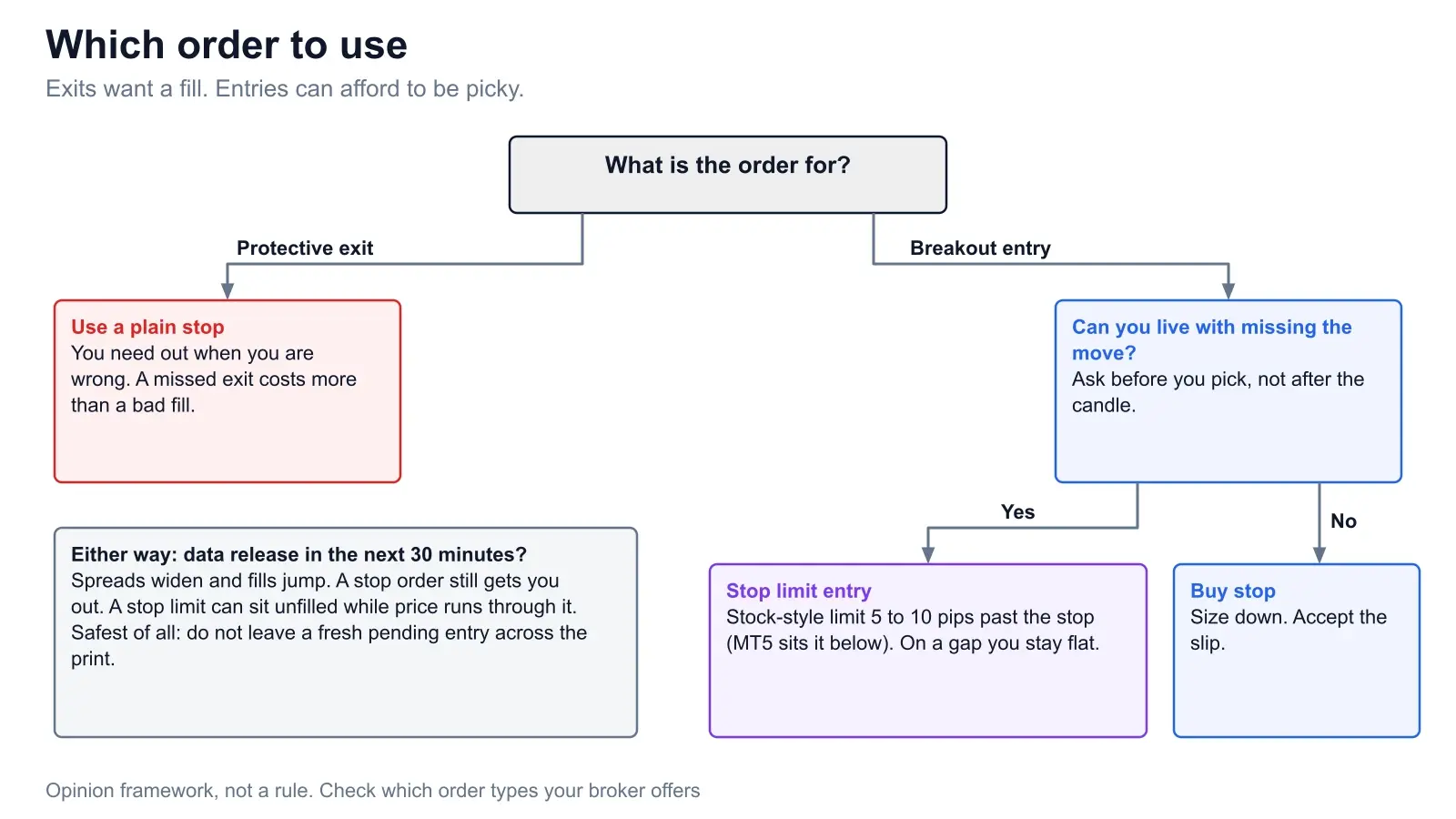
Here is the opinion, stated flatly. For protective stops, use a plain stop order. A protective stop has one job: end the trade when the idea is wrong. A stop limit can fail at exactly that, in exactly the conditions where you needed it, and leave you holding a loser with no stop in it. The gap example above is the standard way it happens, and it is the way a stop limit most often fails.
For breakout entries, a stop limit is often better. If you are happy to skip a trade whose entry price has gone bad, the limit does the skipping for you. That fits stock breakouts especially, and thin books, where a market order can walk a long way.
There are two exceptions on the exit side. First, if you would genuinely rather hold than sell below a number, because it is a liquid market and you will decide by hand, a limit at that number is honest. Second, some brokers sell guaranteed stops that fill at your price for a fee or wider spread. That is a different product from a stop limit, so ask your broker what they offer and what it costs.
7. How to set a stop limit order, and how far to put the limit
You enter the stop price, the limit price, the size and a time-in-force, and make sure the limit sits on the correct side of the stop for your platform. The hard part is the gap between them. Too tight and a normal fast candle jumps it. Too wide and you have built a stop order with extra steps.
For a protective stop that you insist on limiting, set the limit at your worst acceptable loss, not at a hopeful distance. In our example the plan is 50 pips, $500. If you would take a loss of up to 70 pips ($700) but would rather hold than accept worse, the limit goes at 1.0780, which is 20 pips beyond the 1.0800 stop. A limit 5 pips from the stop would have been skipped by both the gap and the news candle above.
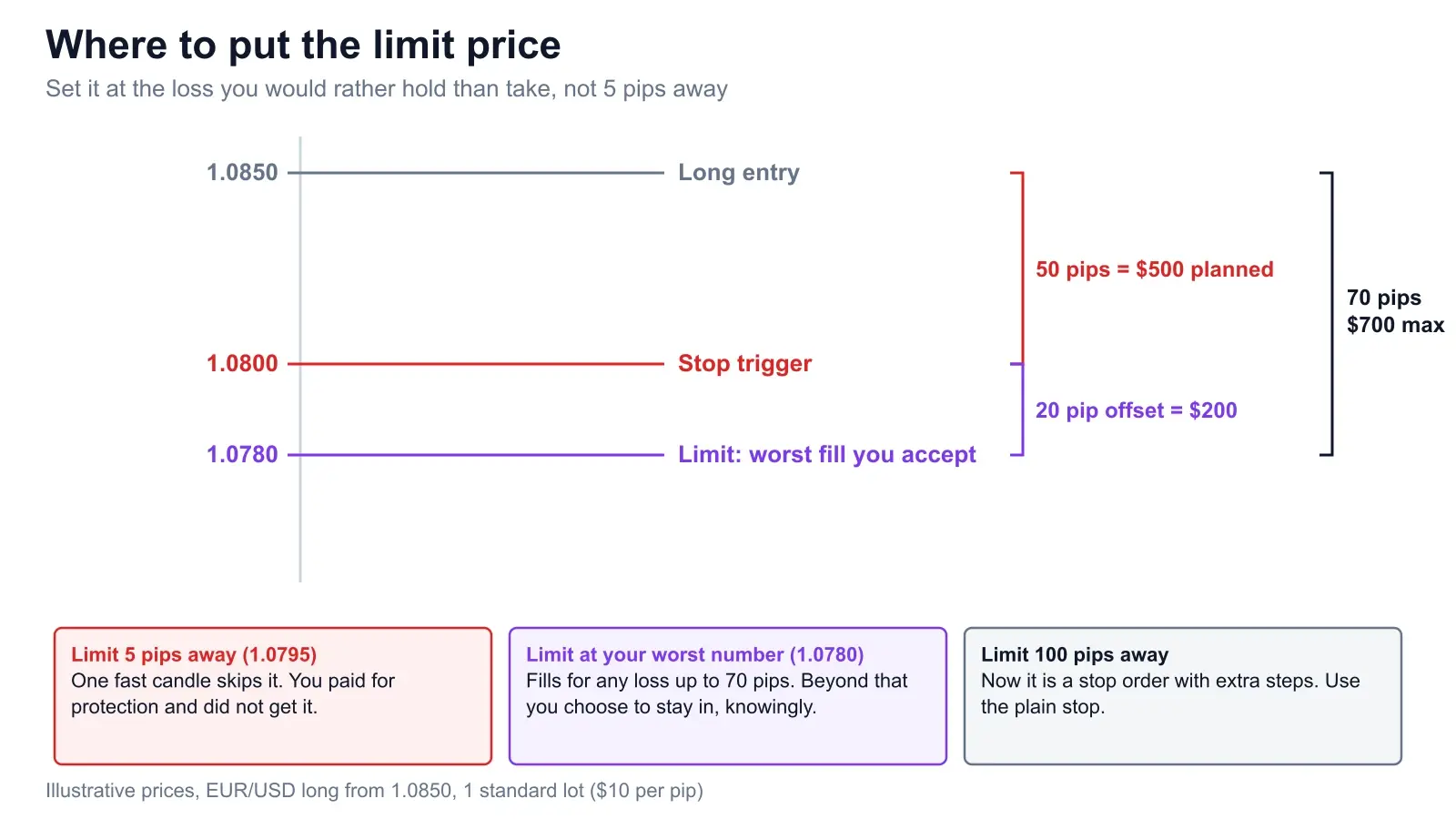
For breakout entries the offset is about how much chasing you will tolerate. Five to ten pips past the stop is a reasonable starting point on a major pair in a normal session, though that range is our own rule of thumb, not a standard, and it needs to scale with the pair's typical candle size and spread. Gold or an index needs a bigger number than EUR/USD. Whatever you pick, work out the dollar cost of being wrong on the fill before you place the order, and log how often the limit actually skipped a good trade in your trading journal.
8. MT4, MT5 and other platforms
MT4 has no stop limit. MetaTrader 4's own help lists four pending orders: Buy Limit, Buy Stop, Sell Limit and Sell Stop. A stop loss on a position is a separate field, and the MT4 help describes it as closing the position automatically when the level is reached. There is no field to attach a limit price to it.
MT5 adds Buy Stop Limit and Sell Stop Limit. MetaTrader 5's help describes them as a combination of a stop and a limit order and gives them a Price field (the trigger) and a Stop Limit field (the price of the limit order placed after the trigger). Here is the catch most stock-trained traders miss. MetaTrader's help says a Buy Stop Limit's stop level is set above the current Ask while its Stop Limit price is set below the stop level, and that a Sell Stop Limit is the mirror image, with the limit above the stop. So MT5's stop limit is a retest entry, not a capped breakout chase. With a stop at 1.0905 and a limit at 1.0895, you only get in if the breakout comes back to test the level. Check the placement in your own terminal before you rely on it.
On both platforms, the stop loss you attach to a position or pending order is a single price with no limit price beside it, so it behaves as a plain stop. For protective exits that is what you want anyway. Support varies by broker, so open your own order ticket and read what it offers. The SEC's bulletin says the same about stocks: these orders may not be available through all brokerage firms.
A related question is how the two compare with a plain limit order. A limit order is live immediately and waits for price to come to you: buy below, sell above. A stop limit is dormant until the stop trades. A stop market order is just another name for a stop order.
Order choice on news days
On a release, spreads widen, liquidity thins and prices jump instead of glide. Every number in this post gets worse. If you must be in, a stop order still gets you out. A stop limit can sit unfilled while the market runs through it. The safest move is not to leave a fresh pending entry across the print at all. Wait for the first candle, then enter after the dust settles, which costs you the opening move and spares you the worst fills. Plan the day ahead with the News Impact calendar, and use the Chart Snipe tool on your chart screenshot to find the support and resistance your stop and trigger should sit beyond.
Frequently asked questions
What is the difference between a stop order and a stop limit order?
Both wait for a trigger price. A stop order then becomes a market order and fills at the next available price, which can be far from the trigger. A stop limit order becomes a limit order and fills only at the limit price or better, so it can stay unfilled if price gaps through. The SEC puts it this way: a limit price may prevent the order from being executed.
What is a stop limit order?
A stop limit order has two prices. When the market reaches the stop price, the order turns into a limit order at the limit price. It controls the price you accept and gives up the promise of a fill. Example from a 1.0850 long: sell stop 1.0800, limit 1.0790. It only sells at 1.0790 or better.
Stop loss vs stop limit: which should protect a trade?
A plain stop loss. A protective stop exists to get you out when you are wrong, and a stop limit can leave you in the trade exactly when price is running through your level. Use a limit only if you can name the loss you would rather hold than take, and set the limit there.
What is a buy stop limit order?
A buy stop limit sits above the market. When price rises to the stop, it places a buy limit instead of a market buy. In stock-style platforms the limit is a little above the stop, so you do not chase. In MetaTrader 5 the limit sits below the stop, so it fills only on a pullback after the breakout.
How far should the limit be from the stop price?
Far enough to survive normal slippage, near enough that you would accept the fill. For a protective exit, put the limit at your worst acceptable loss: with a 50 pip stop and a 70 pip maximum, that is 20 pips beyond the stop. For a breakout entry, 5 to 10 pips past the stop is a common starting point, which is our own rule of thumb rather than a standard.
What is the difference between a limit order and a stop limit order?
A limit order is live now and waits for price to come to your level. A stop limit order is dormant until the stop price trades, and only then becomes a limit order. A limit order buys below or sells above the market. A stop limit order is for acting after price has moved through a level.
Does MT4 have a stop limit order?
No. MetaTrader 4 offers four pending orders: Buy Limit, Sell Limit, Buy Stop and Sell Stop. MetaTrader 5 adds Buy Stop Limit and Sell Stop Limit. Check your own terminal for what your broker offers.
Sources & further reading
- → SEC Investor.gov: Stop, Stop-Limit, and Trailing Stop Orders, the definitions, the $3.00 / $2.50 example and the execution-price warning.
- → FINRA Regulatory Notice 16-19, on stop orders in volatile markets and the no-fill risk of stop limits.
- → MetaTrader 5 help: trading orders, where the Stop Limit price sits relative to the stop level.
- → MetaTrader 5 help: trade operations, the six pending order types and the Stop Limit field.
- → MetaTrader 4 help: orders, the four pending order types and how stop losses are checked against Bid and Ask.
All prices, pips and dollar figures in the worked examples are our own illustrative numbers on one standard EUR/USD lot at $10 per pip. This is education, not a trading recommendation.
Know where your stop belongs before you pick its type
Upload a chart screenshot to the Chart Snipe tool for support and resistance levels, then decide how that stop should be placed. Log each fill in the trading journal and see how much slippage actually costs you.